Friday, April 11, 2014

Power of the Spoken Word

Primary Sources are a great way to connect students to major historical events. One downside of course can be the reading level of some of these texts. Here are eight great audio resources to help students connect with the spoken word that I have used and really like.
A collection of thousands of hours of audio. Check out the U.S. President's Gallery to hear various presidential speeches from Benjamin Harrison to Barack Obama.  Listen here to President Theodore Roosevelt explain why the Big Bosses resist the Progressive Era
This website really is a treasure trove of resources for you and your students if you are studying U.S. Presidents. Check out their Presidential Gallery as well as their Speech Archive. For examples of using this resource with your students, look at their Presidential Classroom. I found this interaction between President John F. Kennedy and head of NASA James Webb discussing the possibility of a lunar landing fascinating.
This is a great resource to listen to former slaves discuss what life was like on the Plantation. I would encourage students to also use the transcripts. I usually have students listen to several excerpts from this collection as part of their study on Plantation life in 1850's.

This resource can be a very helpful resource and tool for multiple reasons (Check out their Wayback Machine to view the changing nature of the Internet for example) You can also find several audio clips that can be helpful in students examination of a historical period by searching their extensive database. Here is a Fireside Chat of President Roosevelt from December 29th, 1940 discussing the growing concerns in Europe that could be used to discuss American Neutrality and Roosevelt's concerns in Asia and Europe. I have also used several excerpts of speeches given my Malcolm X from Famous Speeches of Malcolm X to use as a compare/contrast with speeches given by Dr. King such as his I Have A Dream.

American Rhetoric is a great resource to find famous speeches in history. Check out their Top 100 Speeches to find audio and transcripts of famous speeches in history.
Just like it can be important to use short excerpts from written primary documents, it is also important to use short sections of audio instead of having students listen to an entire 20-40 minute speech. Audacity  is a great free audio editing tool thank makes it easy to trim selected audio sections you want students to listen to into manageable 1-2 minute excepts. 

Most of the resources I listed above are audio recordings of speeches. Librovox is more designed as a free Audio Book Tool for books in Public Domain, but there are some great audio clips that can be used in your classroom. Their Catalog has a growing list of books that get constantly updated and can be searched by author, title, genre, & language. Their US Historical Documents Section has audio readings of the Articles of Confederation, US Constitution, Declaration of Independence, and the Gettysburg Address. For students who need to listen to the text as they read along, this can be a useful tool to help struggling readers engage with the text of these famous documents.
Like Librivox, this is resource for Free Audio Books (that are no longer protected from Copyright) from the University of South Florida. Check out some of their Collections: American Founders, The Civil War, Historic American Documents, and African-American Literature.  If there is a particular author you are looking for check out their Author Section. If you are looking for a certain reading level, check out their Flesh-Kincaid Grade Level section. 

Quick Links to some of my favorite audio resources:


These are some of my favorite audio resources to use with students to connect to the spoken word. Do you have any that should also be included? I would love to hear about them in the comments section below. 

Wednesday, April 2, 2014

Patriot or Loyalist? Espionage During American Revolution

I thought being a spy would be cool...of course I was eight at the time but I thought this was a future job for me. Although I didn't find my way to Langley I still enjoy espionage books and movies. It might have been all of those James Bond movies I watched or Tom Clancy novels I read growing up as a kid. I have always been rather captivated by the spy thriller.

I was very excited when I saw that AMC was coming out with an new TV series called TURN. AMC's latest new show based upon the book Washington's Spies: The Story of America's First Spy Ring by Alexander Rose.


It will be interesting to see how the series captures some of historical elements of this period in American History. You can follow the show on Twitter @TurnAMC as well as the author Alexander Rose @AlexRoseWriter.

With global espionage concerns, the NSA phone scandals, & Edward Snowden there is definitely a lot of potential to tie current events with historical uses of spying in American History and can lead to some great debates among students in your class. These spy stories are definitely captivating tales that will get students excited about history.

Here are some resources that you can use with your students to connect the history behind AMC'sTURN and Spying in the American Revolution:

Spy Letters of the American Revolution is a great resource of the role spies played in the American Revolution, including the Culper Ring which the new AMC series TURN is based upon. The story of the Culper Ring is a very fascinating story and many of the techniques used by these spies are still part of spy trade craft today.
  • Check out the section Methods and Techniques. Here they describe spy craft and how it was used by American and British spies during the American Revolution. 
  • There are also interactive lessons prepared on some of the trade craft used by spies during this period, such as using invisible ink and masking letters.  This would make for some great in class activities.
  • There are also Primary Sources, such as the letters in Gallery of Letters for students to take a look at how secret messages were sent. 

Mount Vernon's Website also has some great information on the Culper Spy Ring and General George Washington's involvement in this espionage. http://www.mountvernon.org/spy

Major Benjamin Tallmadge was General Washington's director of military intelligence and Founders Online has 143 letters between General George Washington and Tallmadge. Have students due a close read of some of their letters to analyze the correspondence between Washington & Tallmadge. (Close Reading Infographic)

Listen to an interview of Alexander Rose from the New York Public Library that is a very in-depth look behind the history behind his book Washington's Spies: The Story of America's First Spy Ring and espionage during this time period.

YouTube Video George Washington the Spy

Read AMC's "TURN": Everything Historians Need to Know article from the Journal of the American Revolution and discuss History V. Hollywood with students.

Read AMC's TURN Online Comic of the Backstory of the Culper Ring or read some of their blog posts about the series.

Mashable also has a very neat infographic titled Spy Toolkit looking at spy tools throughout history. This would be a great resource to have students discuss how technology has changed spying throughout history.

CIA's website for students has a History of American Intelligence to look when and where spying has been used in American History. It is very comprehensive and make sure to check out the information on Anna Strong (one of the members of the Culper Spy Ring and a central character in TURN) and how laundry was used to send coded messages.

If you ever get to Washington DC, a must visit is the International Spy Museum. There are many great exhibits and hands on experiences to learn about the history of espionage.  It was one of my favorite interactive museums in Washington DC.
 Do you have any interesting resources or ideas on incorporating the history of espionage into your curriculum? I would love to hear about them in the comment section below. 

Thursday, March 27, 2014

March Madness: Most Influential In US History

I have to admit that I am somewhat of a big basketball nut. March is also when my wife feels she becomes a basketball widow as wall to wall games are on TV and my attention is to needlessly to say somewhat distracted.

I saw last year several teachers who started using a "March Madness Type Bracket" in their classrooms and I wanted to see if I could replicate this in my own classroom. I wanted to take two strong passions of mine Basketball and History and see if this ignites dialog, debate, and learning with my students.

It Started With The List:

This was probably the hardest thing about starting my bracket; who's in and who's out. I wanted to pick people that my students and I had talked about this year so I decided I would focus on Americans we had studied or would be studying within the first week of starting our brackets. So I settled on famous Americans from 1776 to 1930. I than started to list some of the famous Americans we had studied as part of my survey curriculum of US History. It quickly presented itself that I would be able to establish four categories with about eight people in each categories giving me 32 names. I think that number of 32 was a good starting point. There were a few individuals that I had to leave off and others in hindsight I might not include next time but it did give me a decent starting place.

Using PrintMyBrackets.com I created a 32 team bracket with four divisions: Presidents, Innovators, Reformers, & Military.

Filling Out The Bracket


The success of March Madness in large part comes from all of the brackets, office pools, and competitions that people sign up for leading up to opening weekend. People's investment comes from in large part from who they feel should win. I wanted to recreate that so I created four Google Docs that provided students with short biographies of each of the entries. I also linked to biographies found at  Biography.com to provide students with additional information about each of the individuals to learn about what their significance to US History was (i.e. Alice Paul, George Washington). Students were than tasked with filling out their bracket ahead of time to see who should make their Elite Eight, Final Four, and Championship Game.  Students were encouraged to think critically about each of their choices and be prepared to defend their answers. Students were also told to post who their winner was on my class blog.


Let The Madness Begin

Each Friday for the next five weeks students will vote for which entry should move on. I had a student ask me before we started as they were filling out their bracket "Is there a correct answer?" I had to chuckle and reply, "I don't know how this is going to end and that is the fun. It all depends on how your classmates vote each week."

I also have been enjoying listening to students argue about who should win and why. Seeing students passionate and excited about this has gone beyond my expectations for this project.


Students are voting using a Google Survey I am creating each week and I'm posting results on the following Monday. The nice thing about using GoogleDocs is my ability to quickly determine winners in each round and create the next survey for the following round. I will be excited to find out who makes it to the Championship Round and how students keep going on this project.

Changes For Next Time

A few things I think I might change for next time:
  • See if I can have students generate the list of 32 Americans that should be on the list and open it up to all time periods. I also could make this a larger list and expand up to 64 people. 
  • Have students create signs/posters on who they think should win and post these around the room. 
  • Add a more of a research element into this project where students would need to go beyond posting a blog post, but create some type of final project explaining why this person deserves the title of "Most Influential US Historical Figure." It might be fun for them to create commercials using iMovie or Animoto that we could share leading up to the voting. Students could also create advertisement biography sheets using Edu Gloster or Prezi

March Madness Other Examples And Resources

Do you do a March Madness bracket with your students? I would love to hear about it in the comments section below.

Tuesday, January 7, 2014

A Nation of Immigrants

Here are some of my favorite resources I use with students on our discussion of Immigration in US History.

Interactive Immigration Maps:


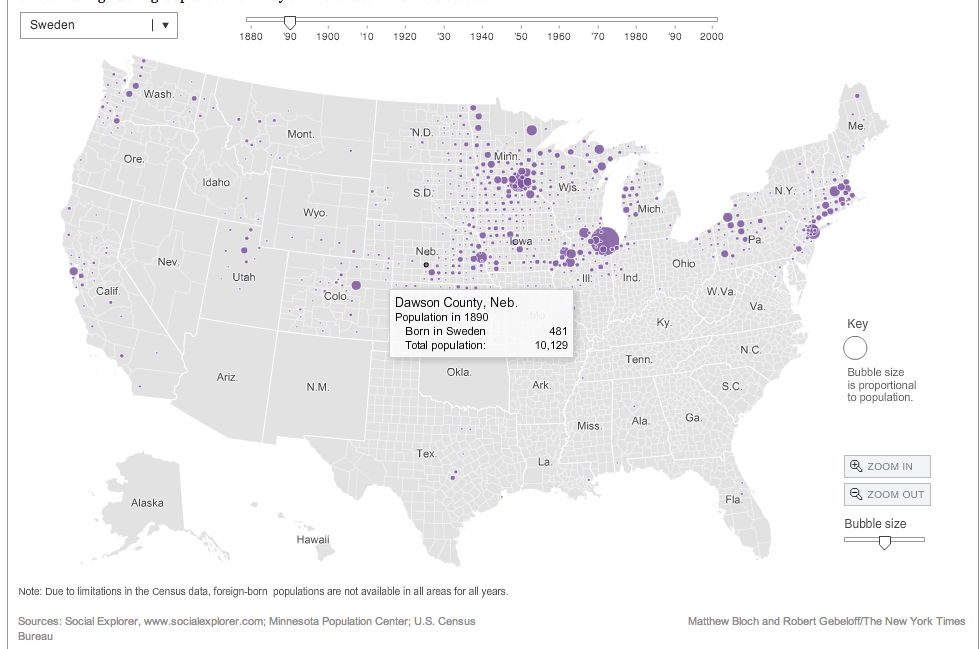
NY Times Immigration Explorer

This is a very nice historical map that lets you explore not only different ethnic groups, but also different time periods as well. This is a great map to look at regions where immigrants settled, like the Swedish population in Gothenburg Nebraska. This can be a fun little discussion starter or tool for students to compare/contrast immigration groups over time.


Can you pass the Citizenship Test?

When we talk about Immigration I usually use this as a time to talk about how Immigration Law has changed throughout US History. One fun little activity I have students is see if they could pass the US Citizenship test that is offered to immigrants today wishing to become US Citizens.

Preparing for the Oath is a great online quiz offered by the National Museum of US History.

iCivics:
iCivics has lots of great educational games about Government, and Immigration Nation is another great game for students to learn about the process of immigration today. This is a good way to introduce students to the process of immigration today. Have students play the game and use a collaborate tool like TodaysMeetPadlet, or Socrative for students to share what they have learned.


The Immigration Experience Project

During this unit we look at Immigration generally throughout US History, but our primary focus is on the large influx of immigrants who came toward the end of the 19th century and the beginning of the 20th century. Students create a "fictional" immigrant that can be based on their own family immigration story and create a Digital Scrap Book of their experience.

Students can create their Scrapbook using iMovie, Keynote, ComicLife, and something I am hoping to try new this year is letting students create an eBook with iBooks Author.


Student Examples


Students use some information from our textbooks, but here are some other great tools to help students get an understanding of the immigrants experience coming to the US.

Scholasitc: Immigration - Stories Of Yesterday And Day
This website from scholastic has a treasure trove of interactives and resources for you and your students to explore. Visit the Virtual Field Trip which is a short video that is full of information about the History of Ellis Island and the immigrants who passed through this check point. You will follow an immigrants journey through Explore Ellis Island.  You can also take a in depth look at some of the different places that immigrants went through in their journey to America. The website also has some really good graphs to help you Explore Immigration Numbers for you and your students to examine historical immigration trends.  The site also has Meet Young Immigrants of today to help students see how immigration still impacts the United States Today. Although the site is directed more towards Elementary age students, Middle School students can still get a lot of information from this website.

Tenement Museum Interactive Experience: This is a great website to lets students take the role of an immigrant and they have to make certain choices on their way to the US. There is lots of great information and videos that go with this site. Once the student has successfully immigrated, there is also a great 360 Virtual tour of life in a tenement in New York that students can explore. 

Ellis Island: Interactive Than and Now  This interactive from the History Channel is a neat picture that looks at how Ellis Island looks today and what it looked like in the early 1900's. The History Channel also has some pretty good short video segments like Ellis Island Medical Inspections Video that are good informational videos for students to watch to learn about Immigration on Ellis Island. 

Immigration from the Library of Congress. Has detailed information about several ethnic groups journey to the US.

immigration: The living mosaic of people: Is a study created website for a project and has lots of good information about a wide variety of immigrant groups.

What are some resources you use for helping students learn about US Immigration? I would love to hear about them in the comments section below. 

Friday, January 3, 2014

Extra Extra.....Using Newspapers In the Classroom

Extra Extra..Read All About It!!!


"Whenever the people are well-informed, they can be trusted in their own government" -Thomas Jefferson.

Using current events in the classroom is a cornerstone of teaching Social Studies. Whenever I am able I always try to incorporate local,  national, and international news into my class discussions. Below are some of my favorite resources I use with looking for current events, using archived newspapers as a primary source, and project resources for students to create their very own newspapers.


Current Events
Here are some of my favorite websites for Current Events I use to help enhance classroom discussions with my students.

Newsuem Front Pages
I had an opportunity last April to visit this Museum in Washington DC and it didn't disappoint. Their website is also a great treasure trove for news and lesson resources for teachers. Check out today's Front Pages from Newspapers from around the World. A great way to look at how different regions or countries report on the same event as a way of discussing "Point of View".

Newspaper Map
This neat little website lets you explore various online websites for various papers from around the world. Using a map of the World, you can find many different news websites for various countries.

CNN Student News
If you are looking for a video recap of some of the major news of the day, CNN Student News is a great way to introduce students to news topics and current events.

Flocabulary: The Week In Rap
This subscription service (Currently $63 a year) is a very fun and informative news video recap of the week's major story. If you spend your Friday's in class looking at Current Events, this is definitely a subscription worth looking into.

10X 10 - 100 Words and Pictures that Define the Time
This website gathers news from ABC, BBC, CNN, The Guardian, MSNBC, and Reuters and creates a 10 X 10 Picture Block of some of the major news happening right now. Click on the image or the side words to view the headlines and links to the articles.


Newspaper Archives


Sinking of the Titanic
If your state has adopted the Common Core Standards, or you just enjoy using Primary Source Material in your classroom you know that finding and using Primary Source Material is an important part of curriculum planning (See my earlier post Getting Started with Primary Sources). Luckily, there are lots of newspapers that have been archived and made available online. Using archived newspapers can be a great way for students to see how people of the time period reacted to these historic events.

For some of these databases it might be good for you as a teacher to pull a selection of samples to use, but showing students some of the basics of how the search works can help them find some valuable resources as well.


Library of Congress Chronicling America
A searchable database of many national Newspapers from 1836-1922, or check out the US Newspaper Directory that is also a searchable database for newspapers from 1690 to present.

TimesMachine-The NewYork Times
The New York Times has been referred to as the "Nation's Paper of Record." You can search through their extensive database of archived papers from the 1850s' to the 1920's.

Google News Archives
Google also has a very extensive search engine of archived newspapers from around the world. This is a great tool to find archived local newspapers to get some local history or local reaction to a historical event or having students examine advertisements from different time periods.

Newseum Digital Classroom (Create a Free Account)
As I mentioned earlier, the Newseum Website also has several online primary source materials you can use. You will have to create a free account, but once you do you will be able to explore these three Newspaper Lessons:  (1) Blood and Ink: Front Pages of the Civil War, (2) Emancipation Proclamation Front Pages Lincoln and Horace Greeley, & (3) Marching for Women's Rights

Create a Paper

Not only is it great to use Newspapers in the classroom, but by having students create their own newspapers can help you create Formative or Summative Assessment opportunities to gage student understanding of historical events. Having students summarize the Who, What, When, Where, & What of an event is great writing practice and an authentic way to measure student understanding of an event. Here are three resources to help students create that perfect Newspaper feel.

Newspaper Clip Generator:
This online web generator is a nifty little way for students to create a short newspaper article. Perfect for a formative assessment of student understanding of an era/event you have been discussing in class.

Printing Press: From Read Write Think
Stop the Presses!!! Here is a nice little Online Printing Press tool from ReadWriteThink that lets students create Newspapers, Brochures, Flyer/Sign, or Posters. They give you some nice templates that you can use and there is also a save option that allows you to save your work to your computer so you can come back to the website to continue your work.

Newspaper PowerPoint Templates
I wish I could say I came up with this, but PresentationMagazine has put together some nice PowerPoint Templates of different Newspaper layouts and have also recently added a Magazine Cover. These templates are very well put together and easy for students to use. It makes for a nice looking final Newspaper layout where students can write several articles summarizing what they have learned from their research on a particular event or topic.

How to Choose Your News- TED-ED Video


What do you use?

I'm always looking for additional resources to try with my students and would love to hear from you in my comments section of resources that you use that work great with students when it comes to using newspapers in your classroom.

Monday, August 19, 2013

Class Expectations With A Hollywood Flair

School is back in session and the first few days of class procedures and polices have been completed with students. These first few days are very tiring because it is a lot of teacher talking and little student doing. To make things a little more interesting, here are some movie clips I show students to help set up expectations for the year. They help set up some interesting discussions with students on what are appropriate and what are inappropriate behaviors in class. I try to keep things simple and use daily repetition to help set up clear room expectations. As you can tell with many of these clips I was a kid of the 80's.

Being Prepared for Class

From Legally Blonde: Elle Wood's First Class at Harvard Law goes terribly wrong.


Talking Points: Know what is needed each day for my class. Come prepared fully ready to learn.

Get To Class On Time

From Fast Times at Ridgemont High: Spicoli meets Mr. Hand for the first time.


Talking Points: I'm not Mr. Hand, but I do care about what you learn in my class. First few days I understand why you might be late, but as an 8th Grade Student I expect you to be in your seat when the bell rings. We have a lot to do each day and a lot to learn about this year so we go from bell to bell. So you don't want to be late and miss out important information.

Why Class Participation is Important 

From Ferris Bueller's Day Off: A Boring Lesson on Economics


Talking Points: My Promise to my students. I wont be the teacher in the clip if you won't be the students in the clip. Specially the last student...ewww gross.

Getting the Teacher's Attention Appropriately
Shrek: Donkey volunteers to help Shrek go find Lord Farquaad


Talking Points: I want you to participate in class, but there is a right way and a wrong way to go about it. I will get you to participate this year by having you raise your hand, whole class choral response, and we will use an interactive response system called Socrative. Remember, you get out of class what you put into it.

Being At Class is Important:

Ferris Bueller's Day Off: Ben Stein takes attendance

Talking Points: I want you here to learn so please be at class.


Why We Have Homework a.ka. Formative Practice

Allen Iverson explains why he wasn't at Practice


Talking Points: Sports, Music, and School requires practice to develop your skills. Formative Work (practice) is just as important as Summative Work (Game/Performance)


What are some ways you help teach room expectations? I would love to hear your thoughts in the comment section below.

Wednesday, August 7, 2013

The Connected Teacher: Staying Connected With Parents and Students

The Connected Teacher: Staying Connected With Parents and Students


It is very important to stay connected to students and parents and have open lines of communication. Below are a few things that I do to help students and parents stay connected and informed to the comings and goings in my classroom.


Google Calendar:
One thing I use to help keep students and parents current on daily classwork, project deadlines, and upcoming assessment dates is the use of Google Calendar. This is a very easy and an effective way to keep students and parents up-to date. I am able to input the week's agenda on my computer's iCAL and I have it set to automatically sync to my Google Calendar. I provide a link to parents to my Calendar at the start of the year and keep a permanent link on my course description on my online grade book. If you are a MAC user and use iCAL, syncing to a Google Calendar is very easy and instructions can be found here on Google's Help Page. I also just learned from Richard Byrne's on FreeTechnologyForTeachers about using Google Calendar to add attachments and assignments.

The Team Weekly Newsletter via a Shared Google Doc:
My interdisciplinary team sends out a weekly newsletter to parents on what is going on in each of our classes. Sending weekly e-mails to our Team Leader to compile the newsletter got to be a big hassle, so we started last year using a shared Google Doc that everybody on our team has permission to edit and we make the Google Doc available to view for our parents.  We send a weekly e-mail to parents at the end of each week with a link to our Google Doc with a reminder that it has been updated. Each teacher shares a little about what is going on in their classes, and we also share the "Word of the Week" and the Student of the Week.

E-mail:
I try and send out an e-mail to parents the week before any major due dates or unit assessments to let parents know of any important class news. Parents have always been very appreciative of this. However due to  the  Google Doc newsletter, I no longer send out as many weekly e-mails.

Online Course Management (Blackboard):
Teaching in a one to one laptop computer environment requires me to have a central location to keep important documents, files, etc. This is an essential way I communicate with my students. I am very lucky that my school district has made the commitment to using Blackboard. If your school does not have a Course Management system, I would look at using tools such as Wikispaces, Blogger, Edmodo, Wordpress, or others to have a virtual 24 hour presence with students.

Remind 101
(Update: Now this service is just Remind)
Something new I'm trying this year is using the free texting service Remind101. I am very excited about using this tool this coming school year. It is a safe place for me to send out text messages to students and parents without having to give them my cell phone number. I am really excited about the possibilities with this service this year. As a High Teacher told me about why they use Remind101, "Students have stopped reading their e-mails, but students have not stopped carrying their cellphones. They are always looking at them."

New Class Twitter Page:
I am also trying this new feature this year with my students. I have created a class Twitter page titled @little_abe_213 to connect with my students in a different way. I am hoping to use this to get out information to students and parents and perhaps run weekly history contests. I don't know how many students have Twitter or will connect to me this way, but I am curious to find out how this platform of social media works. With any history contests I run, I will also make them available on my Blackboard Site for students who can not access Twitter.


Dropbox
To help parents access the various resources and information about my class this year, I am going to use the "Share Feature" in Dropbox as a place for students to access things like textbook information, handouts from curriculum night, etc.. I used to rely on parents navigating through my Blackboard site, but  hope by using Dropbox I can make it easier to share important digital documents to my parents.

Some of these methods of communicating with parents I have used for awhile and there are a few things I am trying new this year.

What are some other ways you connect with students and parents in your classes? I would love to hear about them in the comments section below.