Tuesday, January 7, 2014

A Nation of Immigrants

Here are some of my favorite resources I use with students on our discussion of Immigration in US History.

Interactive Immigration Maps:
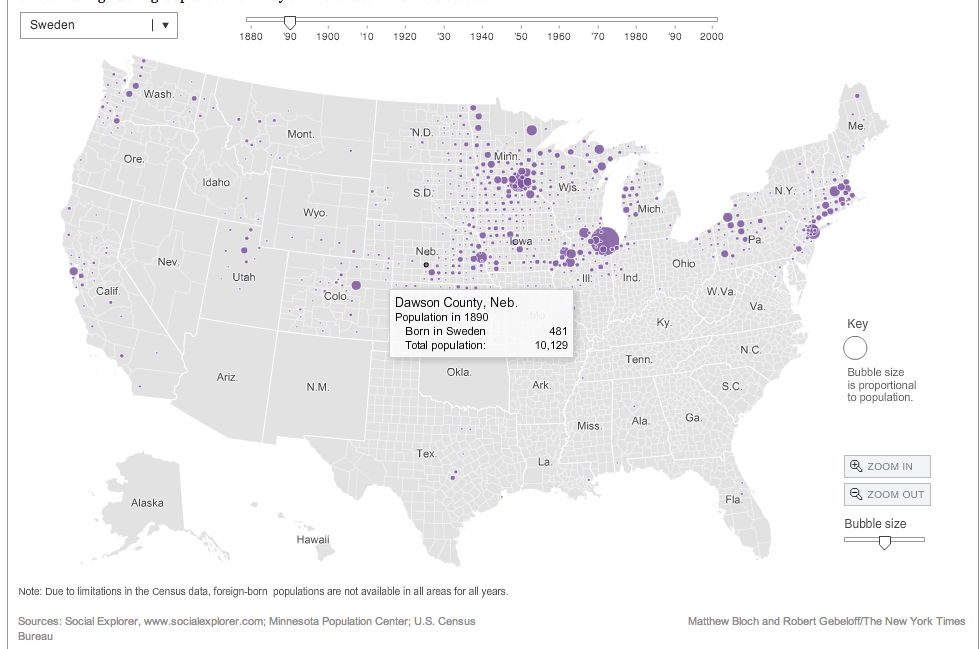


NY Times Immigration Explorer

This is a very nice historical map that lets you explore not only different ethnic groups, but also different time periods as well. This is a great map to look at regions where immigrants settled, like the Swedish population in Gothenburg Nebraska. This can be a fun little discussion starter or tool for students to compare/contrast immigration groups over time.


Can you pass the Citizenship Test?

When we talk about Immigration I usually use this as a time to talk about how Immigration Law has changed throughout US History. One fun little activity I have students is see if they could pass the US Citizenship test that is offered to immigrants today wishing to become US Citizens.

Preparing for the Oath is a great online quiz offered by the National Museum of US History.

iCivics:
iCivics has lots of great educational games about Government, and Immigration Nation is another great game for students to learn about the process of immigration today. This is a good way to introduce students to the process of immigration today. Have students play the game and use a collaborate tool like TodaysMeetPadlet, or Socrative for students to share what they have learned.


The Immigration Experience Project

During this unit we look at Immigration generally throughout US History, but our primary focus is on the large influx of immigrants who came toward the end of the 19th century and the beginning of the 20th century. Students create a "fictional" immigrant that can be based on their own family immigration story and create a Digital Scrap Book of their experience.

Students can create their Scrapbook using iMovie, Keynote, ComicLife, and something I am hoping to try new this year is letting students create an eBook with iBooks Author.


Student Examples


Students use some information from our textbooks, but here are some other great tools to help students get an understanding of the immigrants experience coming to the US.

Scholasitc: Immigration - Stories Of Yesterday And Day
This website from scholastic has a treasure trove of interactives and resources for you and your students to explore. Visit the Virtual Field Trip which is a short video that is full of information about the History of Ellis Island and the immigrants who passed through this check point. You will follow an immigrants journey through Explore Ellis Island.  You can also take a in depth look at some of the different places that immigrants went through in their journey to America. The website also has some really good graphs to help you Explore Immigration Numbers for you and your students to examine historical immigration trends.  The site also has Meet Young Immigrants of today to help students see how immigration still impacts the United States Today. Although the site is directed more towards Elementary age students, Middle School students can still get a lot of information from this website.

Tenement Museum Interactive Experience: This is a great website to lets students take the role of an immigrant and they have to make certain choices on their way to the US. There is lots of great information and videos that go with this site. Once the student has successfully immigrated, there is also a great 360 Virtual tour of life in a tenement in New York that students can explore. 

Ellis Island: Interactive Than and Now  This interactive from the History Channel is a neat picture that looks at how Ellis Island looks today and what it looked like in the early 1900's. The History Channel also has some pretty good short video segments like Ellis Island Medical Inspections Video that are good informational videos for students to watch to learn about Immigration on Ellis Island. 

Immigration from the Library of Congress. Has detailed information about several ethnic groups journey to the US.

immigration: The living mosaic of people: Is a study created website for a project and has lots of good information about a wide variety of immigrant groups.

What are some resources you use for helping students learn about US Immigration? I would love to hear about them in the comments section below. 

Friday, January 3, 2014

Extra Extra.....Using Newspapers In the Classroom

Extra Extra..Read All About It!!!


"Whenever the people are well-informed, they can be trusted in their own government" -Thomas Jefferson.

Using current events in the classroom is a cornerstone of teaching Social Studies. Whenever I am able I always try to incorporate local,  national, and international news into my class discussions. Below are some of my favorite resources I use with looking for current events, using archived newspapers as a primary source, and project resources for students to create their very own newspapers.


Current Events
Here are some of my favorite websites for Current Events I use to help enhance classroom discussions with my students.

Newsuem Front Pages
I had an opportunity last April to visit this Museum in Washington DC and it didn't disappoint. Their website is also a great treasure trove for news and lesson resources for teachers. Check out today's Front Pages from Newspapers from around the World. A great way to look at how different regions or countries report on the same event as a way of discussing "Point of View".

Newspaper Map
This neat little website lets you explore various online websites for various papers from around the world. Using a map of the World, you can find many different news websites for various countries.

CNN Student News
If you are looking for a video recap of some of the major news of the day, CNN Student News is a great way to introduce students to news topics and current events.

Flocabulary: The Week In Rap
This subscription service (Currently $63 a year) is a very fun and informative news video recap of the week's major story. If you spend your Friday's in class looking at Current Events, this is definitely a subscription worth looking into.

10X 10 - 100 Words and Pictures that Define the Time
This website gathers news from ABC, BBC, CNN, The Guardian, MSNBC, and Reuters and creates a 10 X 10 Picture Block of some of the major news happening right now. Click on the image or the side words to view the headlines and links to the articles.


Newspaper Archives


Sinking of the Titanic
If your state has adopted the Common Core Standards, or you just enjoy using Primary Source Material in your classroom you know that finding and using Primary Source Material is an important part of curriculum planning (See my earlier post Getting Started with Primary Sources). Luckily, there are lots of newspapers that have been archived and made available online. Using archived newspapers can be a great way for students to see how people of the time period reacted to these historic events.

For some of these databases it might be good for you as a teacher to pull a selection of samples to use, but showing students some of the basics of how the search works can help them find some valuable resources as well.


Library of Congress Chronicling America
A searchable database of many national Newspapers from 1836-1922, or check out the US Newspaper Directory that is also a searchable database for newspapers from 1690 to present.

TimesMachine-The NewYork Times
The New York Times has been referred to as the "Nation's Paper of Record." You can search through their extensive database of archived papers from the 1850s' to the 1920's.

Google News Archives
Google also has a very extensive search engine of archived newspapers from around the world. This is a great tool to find archived local newspapers to get some local history or local reaction to a historical event or having students examine advertisements from different time periods.

Newseum Digital Classroom (Create a Free Account)
As I mentioned earlier, the Newseum Website also has several online primary source materials you can use. You will have to create a free account, but once you do you will be able to explore these three Newspaper Lessons:  (1) Blood and Ink: Front Pages of the Civil War, (2) Emancipation Proclamation Front Pages Lincoln and Horace Greeley, & (3) Marching for Women's Rights

Create a Paper

Not only is it great to use Newspapers in the classroom, but by having students create their own newspapers can help you create Formative or Summative Assessment opportunities to gage student understanding of historical events. Having students summarize the Who, What, When, Where, & What of an event is great writing practice and an authentic way to measure student understanding of an event. Here are three resources to help students create that perfect Newspaper feel.

Newspaper Clip Generator:
This online web generator is a nifty little way for students to create a short newspaper article. Perfect for a formative assessment of student understanding of an era/event you have been discussing in class.

Printing Press: From Read Write Think
Stop the Presses!!! Here is a nice little Online Printing Press tool from ReadWriteThink that lets students create Newspapers, Brochures, Flyer/Sign, or Posters. They give you some nice templates that you can use and there is also a save option that allows you to save your work to your computer so you can come back to the website to continue your work.

Newspaper PowerPoint Templates
I wish I could say I came up with this, but PresentationMagazine has put together some nice PowerPoint Templates of different Newspaper layouts and have also recently added a Magazine Cover. These templates are very well put together and easy for students to use. It makes for a nice looking final Newspaper layout where students can write several articles summarizing what they have learned from their research on a particular event or topic.

How to Choose Your News- TED-ED Video


What do you use?

I'm always looking for additional resources to try with my students and would love to hear from you in my comments section of resources that you use that work great with students when it comes to using newspapers in your classroom.

Monday, August 19, 2013

Class Expectations With A Hollywood Flair

School is back in session and the first few days of class procedures and polices have been completed with students. These first few days are very tiring because it is a lot of teacher talking and little student doing. To make things a little more interesting, here are some movie clips I show students to help set up expectations for the year. They help set up some interesting discussions with students on what are appropriate and what are inappropriate behaviors in class. I try to keep things simple and use daily repetition to help set up clear room expectations. As you can tell with many of these clips I was a kid of the 80's.

Being Prepared for Class

From Legally Blonde: Elle Wood's First Class at Harvard Law goes terribly wrong.


Talking Points: Know what is needed each day for my class. Come prepared fully ready to learn.

Get To Class On Time

From Fast Times at Ridgemont High: Spicoli meets Mr. Hand for the first time.


Talking Points: I'm not Mr. Hand, but I do care about what you learn in my class. First few days I understand why you might be late, but as an 8th Grade Student I expect you to be in your seat when the bell rings. We have a lot to do each day and a lot to learn about this year so we go from bell to bell. So you don't want to be late and miss out important information.

Why Class Participation is Important 

From Ferris Bueller's Day Off: A Boring Lesson on Economics


Talking Points: My Promise to my students. I wont be the teacher in the clip if you won't be the students in the clip. Specially the last student...ewww gross.

Getting the Teacher's Attention Appropriately
Shrek: Donkey volunteers to help Shrek go find Lord Farquaad


Talking Points: I want you to participate in class, but there is a right way and a wrong way to go about it. I will get you to participate this year by having you raise your hand, whole class choral response, and we will use an interactive response system called Socrative. Remember, you get out of class what you put into it.

Being At Class is Important:

Ferris Bueller's Day Off: Ben Stein takes attendance

Talking Points: I want you here to learn so please be at class.


Why We Have Homework a.ka. Formative Practice

Allen Iverson explains why he wasn't at Practice


Talking Points: Sports, Music, and School requires practice to develop your skills. Formative Work (practice) is just as important as Summative Work (Game/Performance)


What are some ways you help teach room expectations? I would love to hear your thoughts in the comment section below.

Wednesday, August 7, 2013

The Connected Teacher: Staying Connected With Parents and Students

The Connected Teacher: Staying Connected With Parents and Students


It is very important to stay connected to students and parents and have open lines of communication. Below are a few things that I do to help students and parents stay connected and informed to the comings and goings in my classroom.


Google Calendar:
One thing I use to help keep students and parents current on daily classwork, project deadlines, and upcoming assessment dates is the use of Google Calendar. This is a very easy and an effective way to keep students and parents up-to date. I am able to input the week's agenda on my computer's iCAL and I have it set to automatically sync to my Google Calendar. I provide a link to parents to my Calendar at the start of the year and keep a permanent link on my course description on my online grade book. If you are a MAC user and use iCAL, syncing to a Google Calendar is very easy and instructions can be found here on Google's Help Page. I also just learned from Richard Byrne's on FreeTechnologyForTeachers about using Google Calendar to add attachments and assignments.

The Team Weekly Newsletter via a Shared Google Doc:
My interdisciplinary team sends out a weekly newsletter to parents on what is going on in each of our classes. Sending weekly e-mails to our Team Leader to compile the newsletter got to be a big hassle, so we started last year using a shared Google Doc that everybody on our team has permission to edit and we make the Google Doc available to view for our parents.  We send a weekly e-mail to parents at the end of each week with a link to our Google Doc with a reminder that it has been updated. Each teacher shares a little about what is going on in their classes, and we also share the "Word of the Week" and the Student of the Week.

E-mail:
I try and send out an e-mail to parents the week before any major due dates or unit assessments to let parents know of any important class news. Parents have always been very appreciative of this. However due to  the  Google Doc newsletter, I no longer send out as many weekly e-mails.

Online Course Management (Blackboard):
Teaching in a one to one laptop computer environment requires me to have a central location to keep important documents, files, etc. This is an essential way I communicate with my students. I am very lucky that my school district has made the commitment to using Blackboard. If your school does not have a Course Management system, I would look at using tools such as Wikispaces, Blogger, Edmodo, Wordpress, or others to have a virtual 24 hour presence with students.

Remind 101
(Update: Now this service is just Remind)
Something new I'm trying this year is using the free texting service Remind101. I am very excited about using this tool this coming school year. It is a safe place for me to send out text messages to students and parents without having to give them my cell phone number. I am really excited about the possibilities with this service this year. As a High Teacher told me about why they use Remind101, "Students have stopped reading their e-mails, but students have not stopped carrying their cellphones. They are always looking at them."

New Class Twitter Page:
I am also trying this new feature this year with my students. I have created a class Twitter page titled @little_abe_213 to connect with my students in a different way. I am hoping to use this to get out information to students and parents and perhaps run weekly history contests. I don't know how many students have Twitter or will connect to me this way, but I am curious to find out how this platform of social media works. With any history contests I run, I will also make them available on my Blackboard Site for students who can not access Twitter.


Dropbox
To help parents access the various resources and information about my class this year, I am going to use the "Share Feature" in Dropbox as a place for students to access things like textbook information, handouts from curriculum night, etc.. I used to rely on parents navigating through my Blackboard site, but  hope by using Dropbox I can make it easier to share important digital documents to my parents.

Some of these methods of communicating with parents I have used for awhile and there are a few things I am trying new this year.

What are some other ways you connect with students and parents in your classes? I would love to hear about them in the comments section below.


Monday, July 29, 2013

Making Inspirational Posters for your Classroom

  1. Making Inspirational Posters for your Classroom: Four Easy to Use Tools

With "Back To School" signs start appearing in stores, its that time of year again when teachers start planning and preparing for your room.  I like placing famous quotes, inspirational messages, and sound words of wisdom around my room for students to look at. 

I love good inspirational posters, and here are a few free web resources I've collected from other teachers to make your very own Inspirational Posters for your class website, or classroom. I am thinking about even having my Homeroom Students make their very own inspirational posters this year that tells a little more about themselves.  I think this would make for a great getting to know you activity with my students. Using a website like BrainQuotes, might be a good place to start to look for that perfect quote. 


I also think these websites are easy to have students generate their own Internet Memes to explain a concept or idea we are discussing in class. I have seen other teachers on Twitter talking about these projects and I hope to write a future post on this. 

Motivational Poster Generators:


1. Motivator: Create your own Motivational Posters: This site is pretty self-explanatory and easy to use.


2. AutoMotivator: This is very similar to the one above, but I think is a little easier to use. What is nice about this website there are default images that you can use or you can pull images from websites. Just make sure you are using images that are okay to use.


3. Quotes Cover:
This is a pretty neat website to create some very neat graphic images and layouts. There are lots of graphic editors to pick from and lots of options on this site. You can also create pretty cool Twitter or Facebook banners. 


I have seen more and more of these popping around lately, and I was excited to find this generator tool to create my own.


There are lots of possibilities and very creative things these websites can allow you to do. 

What type of websites do you use to help decorate your classroom? I would love to hear about them in the comments section below.

**New 2015: Word Swag **

I wanted to add this IOS App since it has become one of my favorite Photo Apps on the iPhone. It does cost ($3.99) but makes beautiful inspirational images.

Photo by Lance Mosier, created using Word Swag

***New 2016***


Saturday, July 27, 2013

End of the Korean War at 60 Years

Korean War Memorial, Washington D.C.

The Korean War: Resources

Today July 27th, 2013 marks the 60th Anniversary of the signing of the Korean War Armistice.  A war that is often times referred to as "America's Forgotten War" is still an important conflict in American History that impacts our lives today.

Here are some websites I have collected over the past few years from several people on Twitter you can use with your students to learn more about the history of the Korean War, as well as its continued impact.

The Korean War 1950-1953

CNN Video: Korean War Remembered:
Good overview video of the conflict from CNN


The Price of Freedom: From the Smithsonian 
This site does a great in depth look at all of the conflicts that America has been involved in. They have an excellent section on the Korean War with videos, slideshows, and images of artifacts used in the Korean War.

The Korean War from the Naval History & Heritage
An overview of the conflict from the US Navy's perspective.

The Korean War: BrainPop Video
I love using BrainPop videos for my Middle School Students because they are fun to watch and very informative  I am pretty lucky that my school does subscribe to BrainPop videos, but even if don't have a subscription you can get a few free viewings. These are videos definitely worth checking out, so click here to learn more about using BrainPop.

History of the Korean War:
This video is a great summary of the conflict of the Korean War.


The Korean Conflict Today

BBC's Guide on North Korea
The BBC has a good overview about North Korea, including its history in the Korean conflict.

CIA World Fact book on North Korea
A very detailed look at the geography, history, and political structure of North Korea.

Crisis Guide: The Korean Peninsula
From the Council of Foreign Relations, this is a very in depth look at the conflict and tensions that still exist even thought the Korean War has ended 60 years ago today.

President Obama's Speech Commemorating the 60th Anniversary
Video from C-SPAN of the 60th Anniversary of the Korean War Armistice presentation.


Gallery of Images from the Guardian Website on how North Korea celebrated the anniversary of the armistace.

***NEW 2016***

North Korea Interactive via the AP has a lot of great information about the Korean Peninsula

11 Mindblowing facts about North Korea via Business Insider (From 2015)

*** New 2017***

The Korean War for Dummies Via Hip Hughes History (YouTube Channel)
I like Keith Hughes and his video. This video provides lots of general information on this conflict.


Why Did America Fight the Korean War? Via PragerU (YouTube Channel
PragerU provides conservative viewpoints on their videos and this one tackles the reasons why the US gets involved in the Korean War.


What if North Korea 'Won' the Korean War? Via AlternateHistoryHub (Youtube Channel)
Counterfactuals can be interesting to tackle and Alternative History Hub produces some great "What If's" This one looks at if North Korea had successfully unified the Korean Peninsula under their leadership.


Rising Tensions with North Korea via C-Span

Tensions Rise between U.S. and North Korea Over Nuclear Testing via PBS. Check out their lesson plan that goes with the video here.

Follow on Twitter Steve Herman the White House Bureau chief of Voice of America News on Twitter @W7VOA. Lots of insight on this region of the world and provides lots of up to date reporting.

The North Korean Nuclear Threat, explained via Vox


 What do you use to help students learn about the Korean War and the current conflict with North Korea? I would love to hear about your resources in the comment section below.

New July 5, 2017
With recent developments I wanted to share this lesson from PBS Newshour Extra
North Korea Test Fires Missile Capable Of Reaching US. The video is below.


New April 27th, 2018 
The two leaders of Korea met today in a landmark meeting. They have agreed to end the Korean War and start the denuclearization of the Korean Peninsula. Time will tell, but this is a major development.

Korean Summit Highlights from the Washington Post and Live Coverage


Live Coverage from the Washington Post YouTube Channel.

Friday, July 19, 2013

These Are A Few Of My Favorite Things

These Are A Few Of My Favorite Things

Today I had an opportunity to talk to a group of educators from Brazil about my experiences and resources I use as part of our school's laptop 1:1 program. I love sharing some of the great things I have learned teaching in a 1:1 computer environment and what I use with my students. I know I am very fortunate to work in a school where students have access to MacBook Computers. It is a challenge to squeeze in a year's worth of activities, lessons, that we do in my class in a 30-40 minute presentation but below in honor to Julie Andrews here are "A Few Of My Favorite Things."


Beyond the Textbook: 

Virtual Field Trips
Games and Virtual Simulations:
Exit Tickets & Other Quick Formative Assessments: 
Websites Creation or Classroom Enhancers: